How to make a sprite sheet
What a sprite sheet is, the six decisions that make one an engine can actually read, and how to build a full set from a single character image.
Free to start · No credit card · PNG + JSON atlas
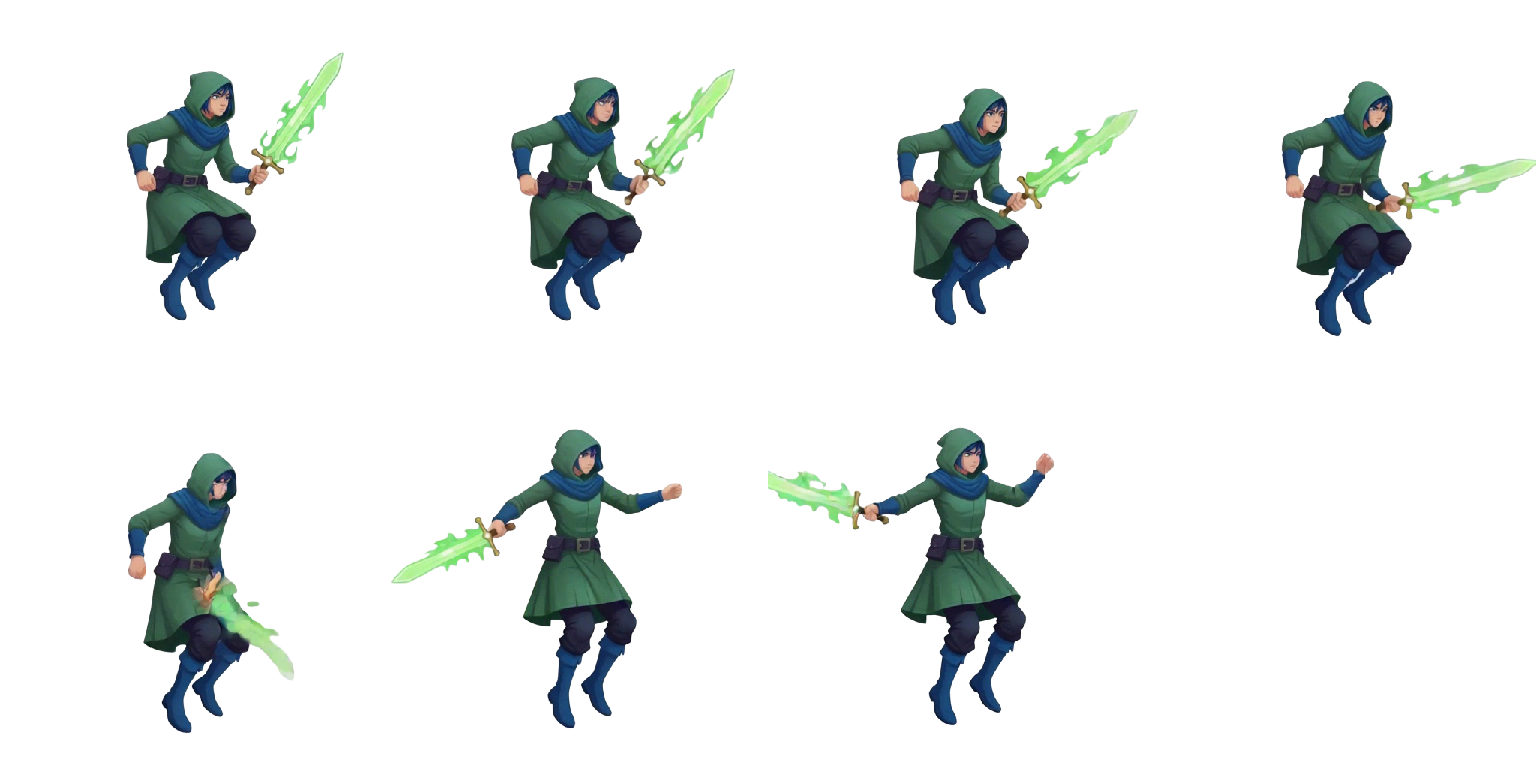
What is a sprite sheet?
A sprite sheet is one image holding every frame of an animation, laid out on a grid. The engine slices it into equal cells and plays through them in order — that is the animation.
One texture instead of forty files means one load, one draw call, and nothing to go missing at build time. Every 2D engine expects it.
Frame
One drawing, one moment of the motion. Every frame on a sheet is the same size, so the grid never drifts.
Grid
The rows and columns the frames sit in. Hand an engine the cell size and it can slice the whole sheet.
Atlas
A JSON file naming each frame's rectangle. Optional on a grid, required once frames vary in size.
"0": { "frame": { "x": 0, "y": 0, "w": 384, "h": 384 } }How to make a sprite sheet
By hand: draw every frame, line them up on a grid in an image editor, export. Below is the same pipeline with the drawing handled for you.
Start from one character
Upload an image or describe it in a prompt. That character stays on-model across every frame that follows.
Pick the motion
Idle, walk, run, jump, attack — or type the move your game needs. Queue as many as you want.
Export the sheet
Transparent PNG on a uniform grid, JSON atlas beside it, individual frames in a ZIP if you want them.
Six things that make a sheet importable
However you produce the frames, these six decide whether the import takes two minutes or an afternoon of chasing seams and jitter.
Frame size
One cell size for the whole sheet, sized to the largest pose so a swung sword never clips. Use a power of two — 64, 128, 256 — where you can.
Grid or atlas
A grid needs only a cell width and height to slice. A packed atlas saves texture memory but needs its JSON alongside. Start with a grid.
Padding and bleed
One or two transparent pixels between frames. Without that gap, texture filtering samples the next cell and you get seams.
Pivot and trim
Bottom-center keeps a platformer's feet planted. Only trim transparent margins if the exporter records each frame's offset, or the sprite jitters.
Naming
character_action_direction, every time. RPG Maker reads $ and ! prefixes, GameMaker wants numbered frames or _stripN. Decide before character two.
Alpha and filtering
Export PNG with a real alpha channel — flattened white shows as a halo on dark levels. Set filtering to nearest for pixel art.
AutoSprite applies all six by default — uniform cells, transparent padding, a bottom-center pivot and a JSON atlas beside every PNG. Building sheets by hand? Run the list above before you export.
Import it into your engine
The sheet is the same everywhere; the import dialog is not. Each page has the settings, the code and the mistakes worth avoiding for that stack.

Unity
Sprite Editor slicing, AnimationClips and Animator setup.
Open workflow
Unreal Engine
Paper 2D extraction, Flipbooks and Blueprint playback.
Open workflow
Godot
AnimatedSprite2D, SpriteFrames and import settings that keep pixels crisp.
Open workflow
GameMaker
Numbered frames or _stripN, sprite origins and playback speed.
Open workflow
Phaser
load.spritesheet, frameWidth and frameHeight, animation keys.
Open workflow
RPG Maker
MV, MZ and VX Ace character sheets, $ and ! prefixes, row order.
Open workflow


Practice on a sheet you know is correct
The quickest way to check your import settings is to slice a sheet that is already right. These three are free at full resolution, PNG plus atlas.
Download the free sheetsSprite sheet FAQ
What is a sprite sheet?
A sprite sheet is one image holding every frame of an animation, laid out on a grid. The engine slices it into equal cells and plays through them in order, which is what produces the movement. One image also means one texture load instead of forty separate files.
How many frames does an animation need?
Six to twelve frames covers most 2D loops. Idle and walk cycles read well at eight, runs at eight to twelve, and short actions like a jump or an attack often work at four to six. More frames means smoother motion and a bigger texture, so match the count to how much screen time the animation actually gets.
What size should each frame be?
Pick one cell size for the whole sheet and size it to the character's largest pose, so an outstretched sword or a full jump never clips. Powers of two — 32x32, 64x64, 128x128 — are the safe choice: GPUs handle them most efficiently and a few older pipelines still require them.
Should I use a grid sheet or a packed atlas?
Use a grid unless you have a reason not to. A grid sheet needs only a cell width and height to slice, so any engine can read it with no extra file. A packed atlas fits differently sized frames together to save texture memory, but it only works alongside a JSON or XML file describing each frame's rectangle.
Why are there seams or ghost edges between my frames?
That is texture filtering sampling the neighboring cell. Leave one to two transparent pixels of padding around every frame, and for pixel art set the texture filter to nearest (sometimes called point) instead of bilinear. It is the most common sprite sheet bug and both fixes take seconds.
Can I make a sprite sheet from a single image?
Yes. AutoSprite animates one character image into a full set of frames — idle, walk, run, jump, attack, or a motion you describe in plain text — keeping the character on-model across every frame, then assembles them into a grid-formatted sheet with a JSON atlas.
Do sprite sheets need transparent backgrounds?
For anything that moves over a level, yes. Export PNG with a real alpha channel rather than flattening onto white, or the sprite carries a pale halo against dark backgrounds. Watch semi-transparent edge pixels for the same reason.
Can I use generated sprites in a commercial game?
Yes. Sprites you generate with AutoSprite are yours to ship — prototypes, game jam entries, early access builds, or full commercial releases.
Skip the forty frames.
Bring one character. Leave with a sheet your engine can read.